
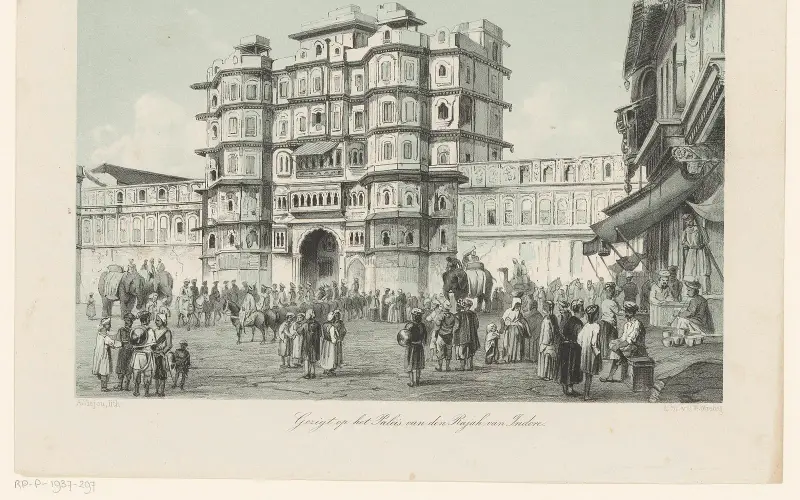
स्वागत है · इन्दौर ज़िला Apna Indore · Madhya Pradesh
Indore: سب کچھ ایک ہی جگہ
🎤 مائیک دبائیں اور بتائیں کیا چاہیے Tap the mic and say what you need
خدمات Services
سب › شادی ہالHalls
 ڈاکٹرDoctors
 مرمتRepairs
 کھاناFood
 کھیتیFarming
 تعلیمEducation
 دکانیںShops
 ٹرانسپورٹTransport
آج Today
مزید ›فوری مدد Quick help
آج · Indore
⚠️ Report✅ ابھی یہاں کچھ نہیں۔
مزید خدمات · More Services
ہر دکان، خدمت اور دفتر — کال، واٹس ایپ اور نقشے کے ساتھ۔
 روزمرہ ضروریاتDaily needs
 تعمیر، سامانConstruction & materials
 گاڑیاں اور گیراجVehicles & garages
 پراپرٹی اور کرایہReal estate & rentals
 شادی اور تقریباتWeddings & events
 خوبصورتی اور فٹنسBeauty & fitness
 ہوٹل اور قیامHotels & stays
 مقامی مصنوعاتMade in Bidar
 پیشہ ور اور فنانسProfessionals & finance
 شہری خدماتCitizen services
 عبادت گاہیں، برادریWorship & community
 Ask Indore
 Your next opportunity
 نوکریاںJobs
Apna Indore · इन्दौर ज़िला
Indore کس لیے مشہور ہے
The pride of Indore, Madhya Pradesh.
آج کی تازہ معلومات
ابھی یہاں کچھ نہیں۔ Post the first one.
Indore دیکھیں
Plan a trip →Indore district is a district of Madhya Pradesh state in central India. It is believed that the city is named after its Indreshwar Mahadev Temple, where Indra is the presiding deity as Indra+Oor. The Gupta inscriptions name Indore as "Indrapura". It is also called the administrative capital. This district forms part of…
10 منٹ میں اپنا کاروبار آن لائن لائیں
Just tell us your business name and type — your site is ready instantly. Add photos from your phone. No technical knowledge needed.
- Your own site: name-indore.mydistrict.in
- Bookings, menus or appointments
- WhatsApp, call and map buttons
- UPI payment details & QR poster
- Listed in the MyDistrict app
- Visitor and enquiry reports
آپ کا ضلع آپ کی جیب میں
Add MyDistrict to your home screen — it works like an app, even on slow networks. Business owners manage their site, bookings and enquiries from the same app.